"What's for dinner tonight?"It's already sorted.
5 minutes on Sunday. A week of good food. And never the same thing.
Piano Piatto plans your lunches and dinners from more than 800 dishes, your own recipes included, and makes the shopping list in your household's quantities. In the evening, all that's left is to cook. And to hear "this is so good".
Free forever. Premium free for 14 days, no credit card.

Tuesday 14 October
Good evening, Léa
Plan your week. Simplify your life.
Free trial: 7 days left Tonight
Veal blanquette
TO DO TODAY
A head start on the meals coming up.

You know the scene
Tuesday, 7:05 pm.
Everyone's hungry, nobody has an idea, and it's always the same person who ends up deciding.
What's for dinner tonight?
Dunno. You?
Whatever you want.
7:40 pm. Nobody chose. Pizza delivery, again.
What's for dinner tonight?
Blanquette. The meat has been defrosting since yesterday.
I'll start, will you set the table?
7:08 pm. The answer was ready since Sunday.
One decision on Sunday, in peace.
Seven evenings when nobody has to think about it.
No more same old menu
Every week, something new to look forward to.
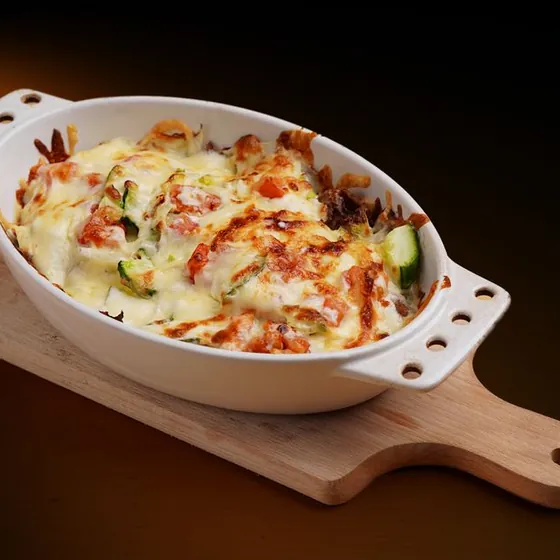
Monday, a gratin browning in the oven. Wednesday, a pad thai filling the kitchen with its aroma. Friday, the paella you'd never have dared make on a weeknight. Last week's dishes make way, and the ones your household loves come back more often.
 Week 1
- Mon.Savoyard gratin
- Tue.Veal blanquetteFavourite
- Wed.Sesame teriyaki salmon
- Thu.Ricotta and spinach ravioli
- Fri.Alsatian tarte flambée
 Week 2
- Mon.Rigatoni with tomato sauce
- Tue.Perch fillets meunière
- Wed.Prawn pad thai
- Thu.Parmesan and chicken risotto
- Fri.Seafood paella
 Week 3
- Mon.Meatballs in tomato sauce
- Tue.Mediterranean halloumi bowl
- Wed.Veal blanquetteIt's back
- Thu.Beef plov with carrots and cumin
- Fri.Homemade four seasons pizza
Three weeks, fifteen evenings, not once the same Monday.
How it works
Five minutes on Sunday. The rest of the week, you cook.
You set up your household once: who eats, what you don't like, the time you have. After that, here's what your weeks look like.
Sundayover a coffee
The week puts itself together
Lunches and dinners, varied, within your budget and your time. Courgettes and cream left in the fridge? The week starts from there, so nothing goes to waste. A dish doesn't appeal? One tap, and another takes its place. And what never changes, the morning porridge or a seasonal fruit as a snack, comes back on its own.
✦ Nothing tempting? The magic wand writes it for youAt the shopa single trip
The list is already done
All the ingredients added up and sorted by aisle, with an estimated price. What you already have in your cupboards isn't on it. No beef on the shelf? Replace it with chicken from the list: the recipe follows. Prefer smaller shops? Plan two, three or four days at a time: each list only covers its own days.
🥛 DAIRY
🥕 FRUIT AND VEGETABLES
Monday eveningthe day before, not too late
It remembers what everyone forgets
The meat to take out of the freezer, the dough that needs to rise, the chickpeas to soak. The app reminds you at the right time, the day before or an hour ahead. Then the recipe is cooked in two phases: the dough first, the cooking at mealtime.
Tuesday, 7 pmdinner time
You cook, without searching
Cooking mode shows the steps in large print, one at a time, and the screen stays on. The quantities are already those of your table.
Add the cream and let it thicken over a low heat.
⏱ 08:00Your own cooking
Your grandmother's lasagne has its place in your week.
Your go-to dishes no longer stay in a sauce-stained notebook. You write them once, and they live alongside the rest: in the plan, in the shopping, in cooking mode.
"Create a recipe": the ingredients, the steps, your photo. Once, for good.
Placed in your week like the others. Quantities follow your table, and the ingredients join the shopping list.
You choose who sees them: just you, your friends, or everyone in Discover.
Like someone else's dish? Copy it, change what you want, and it becomes yours.
The community
Fresh ideas, from real kitchens.
In Discover, the dishes other people really cook, with reviews from those who made them. And from your friends, what they're eating this week, right on the home screen.
Reviews that count: only people who have cooked the dish can rate it. A rating, a few words, "Kids loved it".
Chloe's dish looks tempting? One "+", and it's in your week.
Publish your own, and read what the people who cooked them think.
A heart to keep what you like. Your favourites come back more often in your weeks.
Send a recipe on WhatsApp, even to someone without the app. It opens in their browser, and cooking mode guides them step by step.
A bell so you miss nothing: Marco changed Wednesday's dinner, Léa cooked your focaccia, Sara finished the shopping. It's all in Activity.
Free, for everyone.
Made for your household
Your table's quantities, not a recipe book's
A six-year-old doesn't eat like a teenager. You say who's at the table, the app does the maths, and you stop throwing away half the dish.
Allergies and disliked foods left out automatically. They never come back.
Twenty minutes on weekdays, two hours on Saturday: set both, and no more beef bourguignon on a Tuesday night.
A review that says what to change: the dinner you always skip, the fish that's missing, the budget that's creeping up. And the button that fixes it.
Depending on your household
The same app, three very different weeks
The busy family
Two adults, two children aged 4 and 9
- Weekday dinners in 30 minutes or less, longer cooking saved for Saturday
- No fish for the youngest, left out automatically
- Both parents see the same menu and the same list
✦ Premium, to share the plan
Sunday meal prep
One person, lunches at the office
- Two dishes that alternate, cooked in one go
- Three containers in the fridge, two in the freezer
- Evenings stay free, or planned separately
✦ Premium, for meal prep
The couple who just want an idea
Two adults, a tight budget
- The week generated within the chosen budget
- The list sent by message to whoever does the shopping
- Favourite dishes coming back more often
Free, with Kitchen
Nothing tempting? The recipe writes itself for you.
Say what you fancy. The magic wand writes a complete recipe, designed for your household, and you read it through before keeping it.
- ✦
Your constraints, built in. Allergies, foods nobody likes, diet: it already knows them, you don't have to repeat anything.
- ✦
Your quantities, your time. The meal, the number of people, the minutes you have. The steps and calories follow.
- ✦
You stay in charge. Change whatever you like, add your photo. It joins your dishes, translated into the app's five languages.
20 recipes a month with Premium. During the 14-day trial, one recipe to try it out.
The magic wand
Try it: tap a craving.
Any craving?
a slow-cooked dish for a rainy evening
Meal
Dinner · 45 min
People
Left out automatically for your household: peanuts, coriander
✦ Suggested by the wand
Sweet potato shepherd's pie
⏱ 45 min4 people560 kcal per person
- 500 g minced beef
- 800 g sweet potatoes
- 2 carrots
- 1 onion
- 2 dl stock
- 40 g Parmesan
- Boil the sweet potatoes for 20 min in salted water.
- Fry the onion and grated carrots, then the beef.
- Mash the sweet potatoes and spread them over the meat.
- Sprinkle with Parmesan, then grill for 15 min at 200 °C.
Examples written for this page. In the app, every recipe is written on request.
Pricing
Free forever. CHF 3.35 a month for the whole household.
Your complete week costs nothing, and you keep it for as long as you like. Premium can be tried for 14 days with no credit card: at the end, nothing is charged automatically.
Kitchen
0CHF, forever
Everything you need to decide your week, every week.
- The whole week, or a few days at a time, put together for you
- Your habits kept, and a seasonal fruit as a snack
- The shopping list by aisle, with prices
- Every dish to your taste: an ingredient can be removed or replaced
- Menus that use up what's in your fridge first
- Freezer, pantry and day-before reminders
- Your table's quantities
- Cooking mode and the whole catalogue
- The review of your weeks, over 4 weeks
- Your friends' week, and their dishes in yours in one tap
- A recipe sent by link, even to someone without the app
✦ Premium
39.90CHF a year
That's 3.35 a month, for up to six people. Or 6.90 a month, no commitment.
- The whole household on the same plan, live
- One subscription, the others pay nothing
- The magic wand: tell it what you fancy, and the recipe writes itself for you. 20 a month New
- Meal prep, with dishes that cook in their containers
- Up to 8 weeks planned ahead
- The review over 12 weeks, compared with the previous period
- Everything Kitchen does
The two plans in detail
| Feature | Kitchen | ✦ Premium |
|---|---|---|
| Generated week and shopping list | ✓ | ✓ |
| Menus that start from what you already have | ✓ | ✓ |
| Freezer, pantry and reminders | ✓ | ✓ |
| Catalogue, Discover and cooking mode | ✓ | ✓ |
| Reviews from people who cooked the dish | ✓ | ✓ |
| See your friends' week, take one of their dishes | ✓ | ✓ |
| Shared household, up to 6 people | ✕ | ✓ |
| Meal prep and dishes cooked in their containers | ✕ | ✓ |
| Copy a friend's whole week | ✕ | ✓ |
| Review compared with the previous period | ✕ | ✓ |
| Recipes written by the magic wand | ✕ | 20 a month |
| Weeks planned ahead | the current week | up to 8 |
| Review of your weeks | 4 wks | 12 wks |
| Recipe copies | 3 a week | unlimited |
On your phone or your computer
No app store needed
Piano Piatto opens in your browser. In three steps, it installs like a real app, on your home screen or your computer: an icon, its own window, and it starts right away.
Open app.pianopiatto.com in Safari. On iPhone, it's the only browser that can install an app.
Tap the Share button at the bottom of the screen, the square with the arrow pointing up.
Scroll down the list and choose "Add to Home Screen", then Add.
The Piano Piatto icon appears with your other apps, and opens full screen with no address bar.
The app opens in Chrome and offers to install itself: you just have to confirm. If nothing appears, here are the steps by hand.
Open app.pianopiatto.com in Chrome.
Open the ⋮ menu at the top right and choose "Install app" (sometimes "Add to Home screen").
Confirm with Install.
Piano Piatto joins your app drawer like any other app.
Windows
With Chrome or Edge
Open app.pianopiatto.com.
To the right of the address bar, click the install icon (a screen with an arrow). In Edge, it's called "App available".
Click Install. Piano Piatto appears in the Start menu, and you can pin it to the taskbar.
Mac
With Safari
Open app.pianopiatto.com.
In the menu bar, choose File then "Add to Dock".
Click Add. The icon joins your Dock and the app opens in its own window.
With Chrome on a Mac, it's the same as on Windows.
The install icon may take a few seconds to appear: the browser waits until the app has loaded. Firefox can't install web apps: use Chrome, Edge or Safari.
We started Piano Piatto for a very simple reason: every evening around 7 pm, the same question, and nobody wanted to answer it. Now, at our place, we decide on Sunday. The rest of the week, we cook.
Piano Piatto is made in Switzerland. A question, an idea, a dish you miss? A real person reads every message, and replies.